Anime and donghua together
AnimePahe handles mainstream anime while always-on Animexin resolves donghua through Dailymotion and ok.ru. An optional 18+ playback catalog stays disabled by default.
Discover through AniList, stream anime and donghua, keep exact-quality downloads, and bring your own local files. No required account, no cloud library, and checksum-verified updates on Windows and Linux.
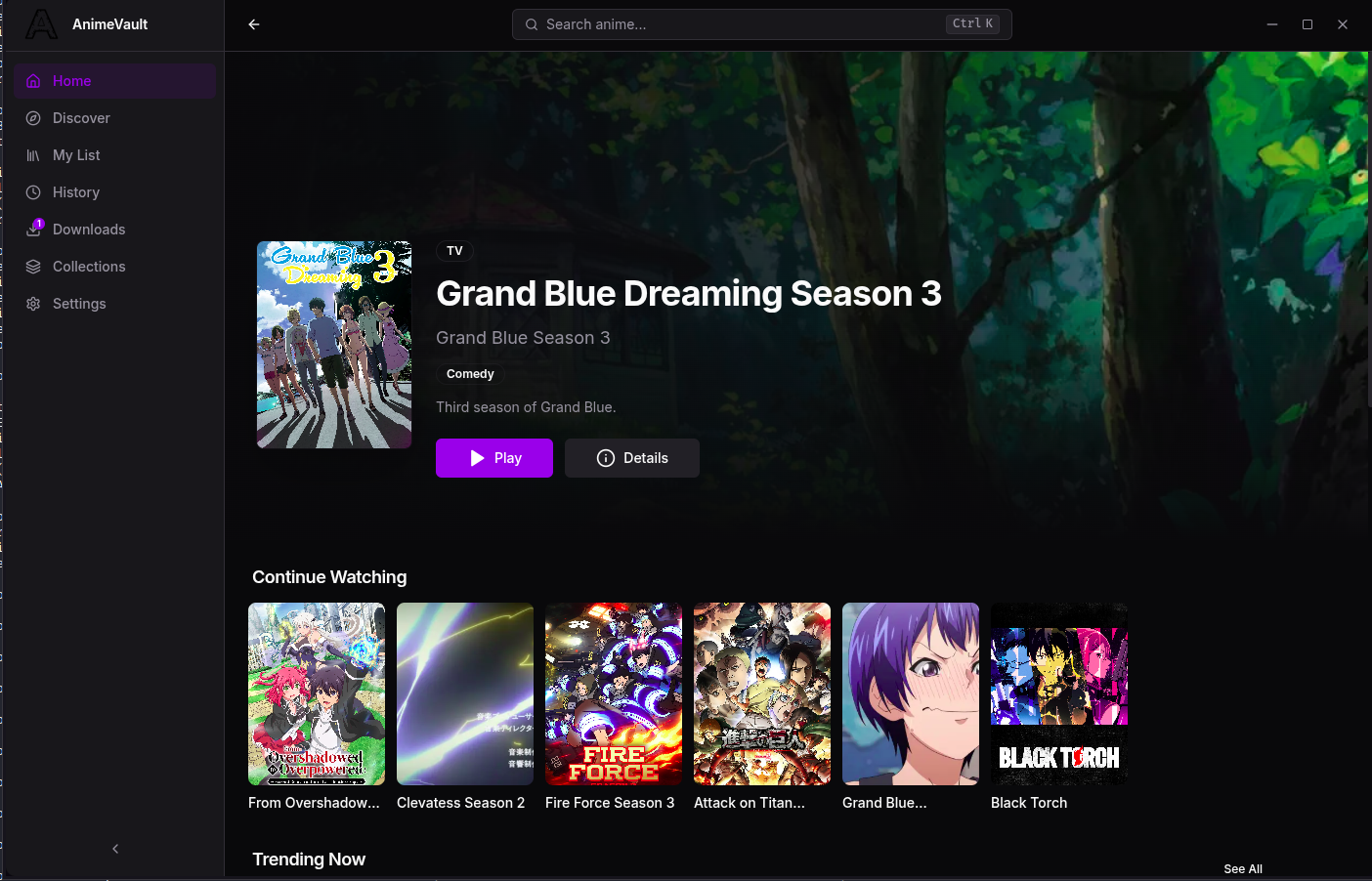
The biggest update yet
The current release expands AnimeVault beyond its original AnimePahe shell and strengthens the parts that matter during a long watch session.
AnimeVault now treats streaming, downloads, local media, and provider failures as one connected desktop experience instead of separate tools.
AnimePahe handles mainstream anime while always-on Animexin resolves donghua through Dailymotion and ok.ru. An optional 18+ playback catalog stays disabled by default.
The player gains a redesigned queue, downloaded-only filtering, a clearer Up Next banner, source-safe switching, and separate automatic opening and outro controls.
Requested height and Sub/Dub variants are never silently replaced. Interrupted rows recover, partial files resume, and completed shows can move across drives.
Local folders gain progress tracking, conservative external-drive relinking, correct media types, and playback through the same polished player.
Data Saver reduces buffers and retries, pauses optional background enrichment, and builds autoplay queues from downloaded episodes before touching a provider.
Sender-scoped IPC, navigation controls, DNS-aware SSRF protection, exact host pinning, and fail-closed update checks now guard the application boundary.
What's inside
Every feature is shaped around the experience of watching anime — not around looking like a dashboard.
A custom HLS player with source-safe quality switching, Sub/Dub tracks, picture-in-picture, keyboard controls, an episode queue, and a calmer Up Next flow.
Anime and donghua · real CDN quality labelsKeep the manual AniSkip buttons, or enable separate automatic opening and outro settings. Timing works for streamed and downloaded episodes whenever source data exists.
Queue exact provider rungs with yt-dlp. Pause, resume, recover interrupted sessions, move completed shows between drives, and never accept a silent quality substitution.
AniList metadata, AnimePahe releases, and Animexin donghua share one search, seasonal browser, recommendation system, and provider-aware details page.
My List statuses, a built-in Favorites collection, custom collections, watch history, and per-episode resume keep every route back to a show consistent.
Point it at a folder, keep progress locally, and reconnect moved external drives through unique name-and-size matching instead of unsafe guesses.
One app for Windows and Linux, shipping in five x64 formats. The install scripts verify GitHub's published SHA-256 asset digest, while in-app update paths validate their update package checksums.
Auto-updates · no sudo · silent installTrust & safety
Update packages are verified, renderer privileges are narrow, and external stream URLs are treated as untrusted input at every proxy hop.
Install scripts verify GitHub's SHA-256 asset digest, and the in-app tarball/electron-updater paths validate their expected checksums before applying a download.
The UI runs in a sandboxed Electron process behind context isolation — a compromised page can't reach your filesystem.
The local HLS proxy validates URL syntax, every redirect, and resolved IP addresses so a malicious manifest cannot target your private network.
Renderer calls are limited to the main app frame, pass zod validation, and expose only the curated preload API instead of raw Electron access.
Behind the project
AnimeVault is an independent desktop project shaped around a straightforward idea: watching, organizing, and downloading anime on your own computer should feel intentional, dependable, and private. Vincent designs and maintains the application, its provider integrations, installers, and release infrastructure.
Get the app
Five x64 builds for Windows and Linux. Pick your platform, or install with one command — verified against the published SHA-256 digest. yt-dlp ships inside the Windows installer and is a one-line prerequisite on Linux.
Or just download and run setup.exe — no admin rights needed.
All releases on GitHub Releases, each with a published SHA-256 digest. Native ARM64 artifacts are not currently available. Re-run the install command to update — or let the in-app updater do it.
Questions
Everything you need to know before you press play.
Yes — AnimeVault is free to use. No accounts, no subscriptions, no paywalled features. Just download it and watch.
Not yet. AnimeVault currently supports Windows and Linux only, with a macOS build planned for a future release.
Yes. Install scripts verify GitHub's published SHA-256 digest, in-app updates validate their package checksums, the renderer runs sandboxed behind context isolation, and the app collects no personal data — your library never leaves your machine.
No. There are no sign-ups or cloud library. Your list, history, settings, and downloads stay on your device; streaming only contacts the provider needed for the title you choose.
Yes. Animexin provides always-on donghua discovery and playback through Dailymotion and ok.ru sources, with their real quality labels preserved.